• Impact Forms
  • Pricing

Best Addon for Elementor

Elementor Advanced Heading Widget

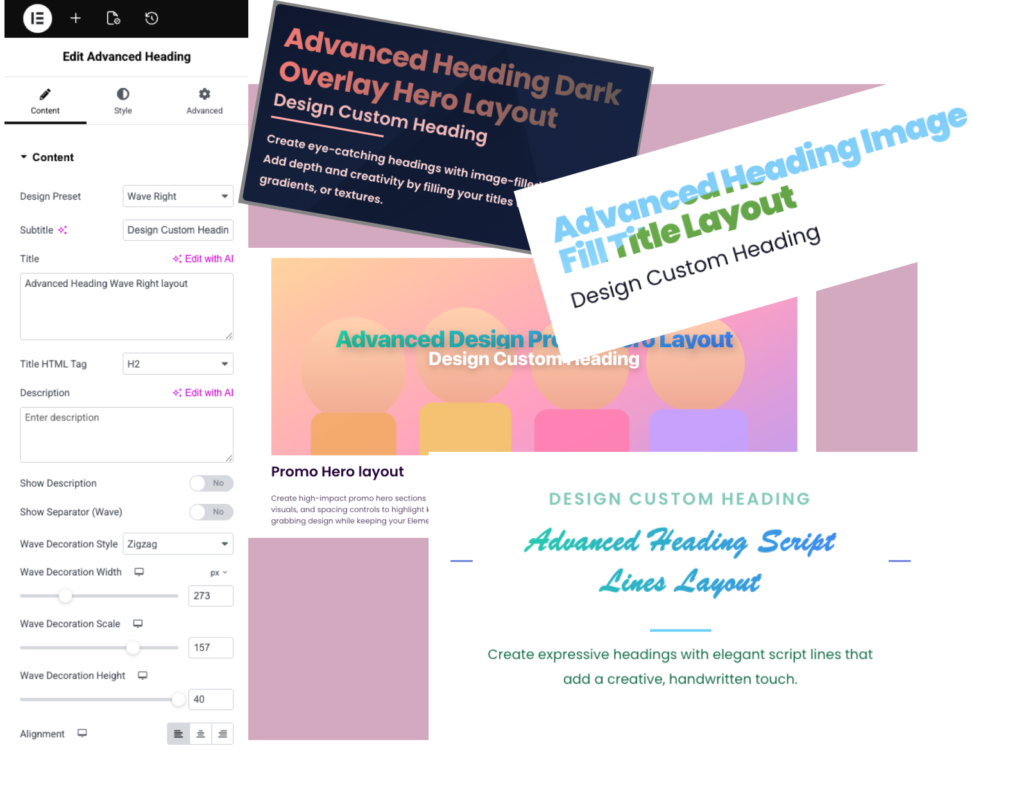
The Elementor Advanced Heading Widget helps you create eye-catching titles, section headings, highlighted text, and professional content layouts. Customize typography, colors, separators, and styling to improve the visual appearance of your website.

Elementor Advanced Heading Widget

Why Usethe Elementor Advanced Heading Widget?

The Elementor Advanced Heading Widget allows you to create attractive headings that capture attention and improve content structure. It helps organize pages, highlight important information, and create professional-looking website sections.

Highlight Key Messages

Make important titles and section headings stand out.

Improve Visual Hierarchy

Guide visitors through your content with clear headings.

Advanced Styling Control

Customize typography, colors, spacing, badges, and effects.

Fully Responsive

Looks great on desktop, tablet, and mobile devices.

Live Widget Examples

Explore real examples of the Advanced Heading widget and see how different heading styles can improve your Elementor sections.

Advanced Heading Clean minimal layout​

Design Custom Heading
Create eye-catching text displays using our Elementor Text Editor widget.

Gradient Heading Style

Create clean, modern section headings with advanced styling, typography, and spacing controls. Highlight your content with minimal design, subtle animations, and full customization—perfect for building elegant, professional layouts in Elementor without complexity

Badge & Subtitle Heading

Create bold, attention-grabbing headings with a clean dark badge style. Combine striking typography with customizable badges, colors, and spacing to highlight key messages. Perfect for modern, high-contrast layouts, this design adds depth, clarity, and visual impact to your Elementor sections while keeping full control in your hands.

Advanced Heading Dark Badge layout​

Design Custom Heading
Create clean, modern section headings with advanced styling, typography, and spacing controls.

Advanced Heading Image Fill Title layout​

Design Custom Heading
Create clean, modern section headings with advanced styling, typography, and spacing controls.

Image Fill Text Heading

Create eye-catching headings with image-filled text effects. Add depth and creativity by filling your titles with images, gradients, or textures. Fully customizable and perfect for modern designs, this layout helps your content stand out while maintaining a clean and professional look in Elementor.

Dark Overlay Hero layout

Create powerful hero sections with a dark overlay for enhanced readability and visual impact. Combine bold headings with background images, smooth overlays, and precise typography controls. Perfect for highlighting key messages, this layout ensures your content stands out while maintaining a sleek, modern look in Elementor.

Advanced Heading Dark Overlay Hero layout

Design Custom Heading
Create eye-catching headings with image-filled text effects. Add depth and creativity by filling your titles with images, gradients, or textures.

Advanced Heading Elegant Script layout​

Design Custom Heading
Create eye-catching headings with image-filled text effects. Add depth and creativity by filling your titles with images, gradients, or textures.

Elegant Script layout

Add a touch of sophistication with elegant script-style headings. Combine graceful typography with modern controls to create stylish, expressive titles. Perfect for premium, creative, or personal websites, this layout enhances visual appeal while keeping your design clean, balanced, and fully customizable in Elementor.

Script Lines layout

Create expressive headings with elegant script lines that add a creative, handwritten touch. Combine stylish typography with decorative line accents, spacing, and color controls to highlight key text. Perfect for modern and artistic layouts, this design brings personality while keeping your Elementor pages clean and visually engaging.

Design Custom Heading

Advanced Heading Script Lines layout

Create expressive headings with elegant script lines that add a creative, handwritten touch.
Design Custom Heading

Advanced Heading Split Block layout

Create visually balanced headings with a split block layout that divides content into distinct sections.

Split Block layout

Create visually balanced headings with a split block layout that divides content into distinct sections. Combine bold typography with contrasting backgrounds, spacing, and alignment controls to highlight key messages. Perfect for modern designs, this layout adds structure, clarity, and a dynamic look to your Elementor pages.

Advanced Heading Wave Right layout

Design Custom Heading

Wave Right layout

Design dynamic headings with a smooth wave accent flowing to the right. Combine modern typography with curved shapes, spacing controls, and customizable colors to create a fluid, engaging look. Perfect for contemporary layouts, this style adds motion and visual interest while keeping your Elementor design clean and professional.

Advanced Heading blob Background layout

Design Custom Heading

Blob Background layout

Create eye-catching headings with soft, organic blob backgrounds that add depth and personality. Combine modern typography with fluid shapes, color controls, and spacing options to craft unique, creative layouts. Perfect for trendy designs, this style enhances visual appeal while keeping your Elementor pages clean, balanced, and engaging.
Design Custom Heading

Advanced Heading Custom layout

Custom design layout

Create fully customizable headings tailored to your unique design needs. Adjust typography, colors, spacing, backgrounds, and advanced styling options to match your brand perfectly. Ideal for any layout, this flexible design gives you complete creative control to build modern, professional, and visually engaging Elementor pages.

Advanced Design Promo Hero layout

Design Custom Heading

Promo Hero layout

Create high-impact promo hero sections with bold headings and clear call-to-action focus. Combine striking typography, background visuals, and spacing controls to highlight key offers or messages. Perfect for campaigns and landing pages, this layout delivers attention-grabbing design while keeping your Elementor pages clean, modern, and conversion-focused.

Key Features

Creative Heading Styles

Badge & Label Support

Image Fill Text

Overlay Heading Layouts

Script & Decorative Styles

Typography Controls

Advanced Spacing Controls

Lightweight & Fast

FrequentlyAsked Questions

Yes. The widget works with Elementor-based websites. Some advanced styling options may be available in the Pro version.

Yes. The Elementor Advanced Heading Widget lets you highlight specific words or phrases using custom colors, styles, and typography settings to attract visitor attention.

Yes. You can customize fonts, colors, spacing, alignment, badges, backgrounds, and decorative styles.

Yes. Advanced Heading supports creative heading styles such as image fill, overlays, badges, and custom layouts.

Yes, it is ideal for hero sections, landing pages, sales pages, and marketing content.

Yes. The Elementor Advanced Heading Widget is fully responsive and allows you to customize heading styles for desktop, tablet, and mobile devices.

Yes. You can create bold hero headings, promo titles, section headings, and marketing headlines.

No. The widget is lightweight and built for fast Elementor page performance.

Yes, you can combine badges, highlighted text, decorative elements, and advanced typography styles.

You can use the Elementor Advanced Heading Widget in hero sections, service pages, landing pages, product showcases, blog layouts, and call-to-action sections to create professional and engaging website content.

Ready to Build Better Headings?

Design professional section titles, hero headings, badges, and creative typography with Advanced Heading for Elementor.

Related Widgets

Explore more Elementor widgets to build interactive and engaging website sections.