Best Addon for Elementor
Circle Info for Elementor
The Elementor Circle Info Widget helps you create interactive circular content layouts with icons, images, titles, and descriptions. Display services, features, processes, benefits, and business information in a visually engaging and user-friendly format.
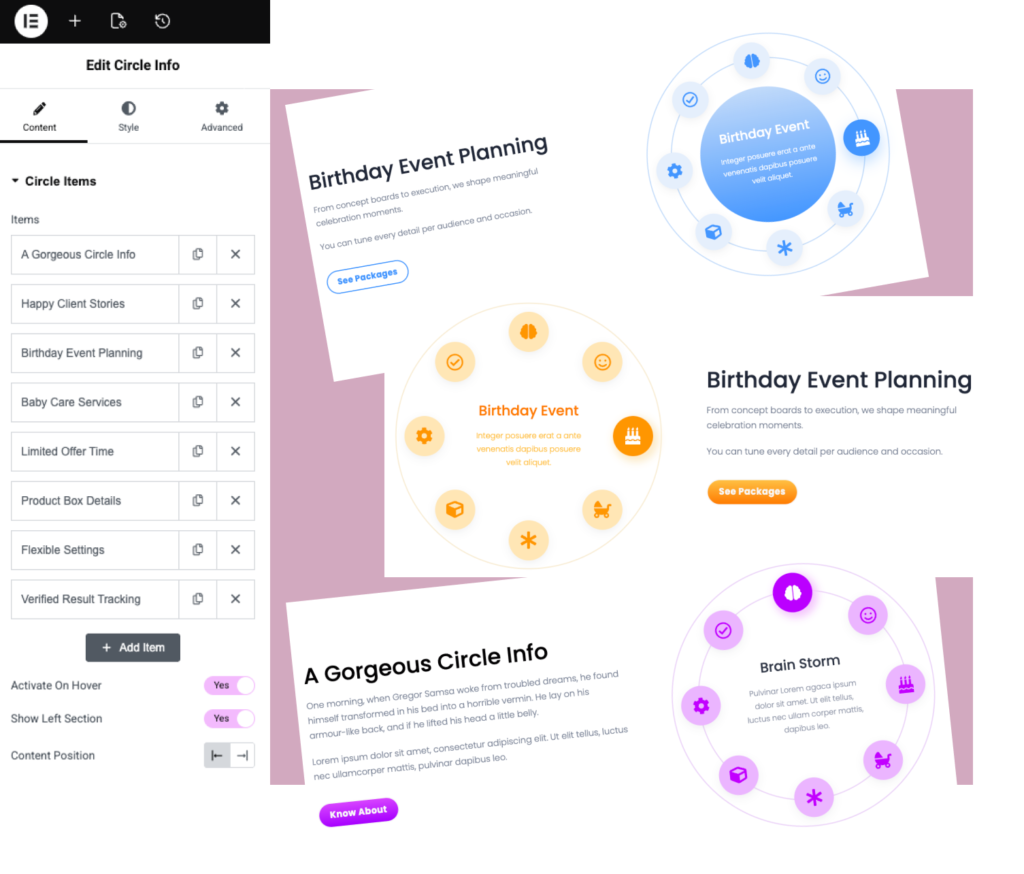
The Elementor Circle Info Widget allows you to present information in a unique circular layout that attracts attention and improves content presentation. It is ideal for showcasing services, workflows, team members, features, and business highlights.
What is the Elementor Circle Info Widget?
The Elementor Circle Info Widget allows you to display information in an interactive circular layout using icons, images, titles, and descriptions.
Is Circle Info available in the free version?
No. Circle Info is a premium widget available exclusively in Impact Widgets Pro.
Do I need Elementor Pro to use Circle Info?
No. Circle Info works with Impact Widgets Pro and does not require Elementor Pro.
Can I add icons and images?
Yes. You can use icons, images, SVG graphics, and custom visual elements within the circular layout.
Can I display multiple items with the Elementor Circle Info Widget?
Yes. The Elementor Circle Info Widget allows you to showcase multiple services, features, benefits, or content items within a single circular layout.
Where can I use the Elementor Circle Info Widget?
You can use the Elementor Circle Info Widget for service sections, feature highlights, team showcases, process steps, business benefits, and interactive content presentations.
Is the Elementor Circle Info Widget mobile responsive?
Yes. The Elementor Circle Info Widget is fully responsive and works smoothly across desktop, tablet, and mobile devices.
Can I customize colors and typography?
Yes. Customize colors, typography, spacing, borders, icons, and layout styling.
Can I use Circle Info for services and features?
Yes. It’s ideal for services, features, benefits, team sections, process flows, and business information.
Will Circle Info affect website performance?
No. The widget is lightweight and optimized for fast-loading Elementor websites.
Why should I use the Elementor Circle Info Widget instead of traditional content boxes?
The Elementor Circle Info Widget presents information in a visually engaging circular format that helps attract visitor attention and improves the overall user experience compared to standard content layouts.