Impact Addons
Build Fast. Impact Bigger

- Products
-
-
Elementor
Impact WidgetsElementor widget pack with advanced design widgets.
Impact Grid AddonElementor grid widget addon with flexible card layouts and design controls.
Impact Template BuilderWooCommerce template builder for Cart and Checkout with Elementor-powered Impact Pro Templates.
Impact FormsElementor contact form builder with submission storage and email workflows.
-
-
- Widgets
-
-
Impact Widgets
Impact Grid Addon
-
-
- Templates
-
-

Impact Template Builder
-
-
- Impact Forms
- Pricing
- Resources
- Support
Best Addon for Elementor
Retina Logo Widget for Elementor
Display sharp, high-resolution logos that look perfect on Retina, 4K, and high-DPI displays. Upload standard and Retina versions of your logo, customize sizing, alignment, links, and styling, and maintain consistent branding across your Elementor website without writing a single line of code.
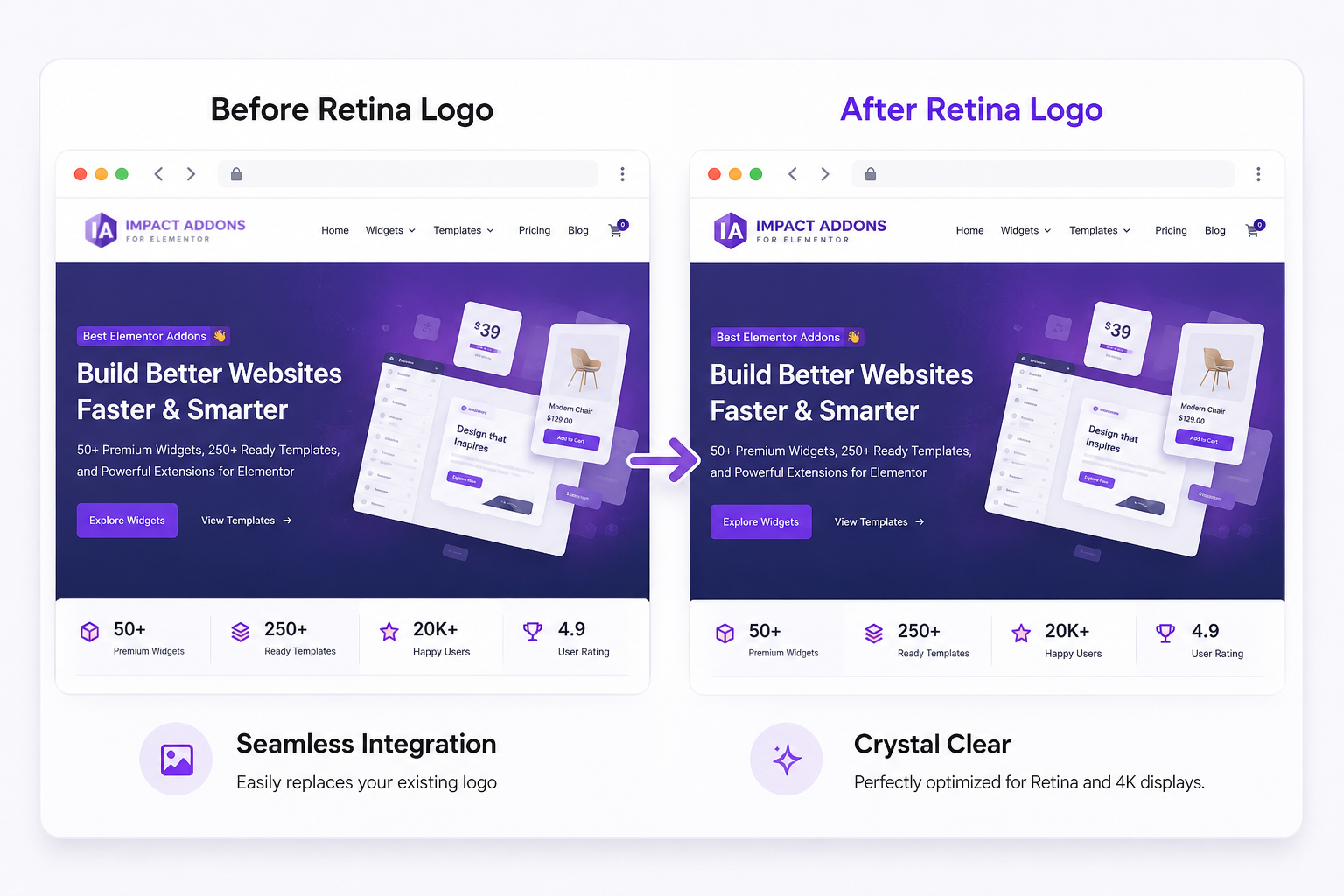
Why UseRetina Logo?
Display a professional, high-quality logo that remains perfectly sharp on every device. The Retina Logo widget automatically serves high-resolution logo images to Retina and high-DPI displays, improving your website’s branding and visual quality.
Responsive Design
Display perfectly optimized tables across desktop, tablet, and mobile devices with responsive layout controls.
WordPress & WooCommerce Support
Add text, images, icons, buttons, ratings, badges, links, and custom HTML inside any table cell.
Complete Styling Control
Customize table headers, rows, columns, cells, borders, colors, spacing, typography, hover effects, and alternating row styles.
Product Comparison Tables
Build feature comparison tables that help customers easily evaluate products, services, pricing plans, or software.
WHAT CAN YOU BUILD?
3 Easy Step To Add Retina Logo
Follow these simple steps to make your logo look sharp and professional on all devices
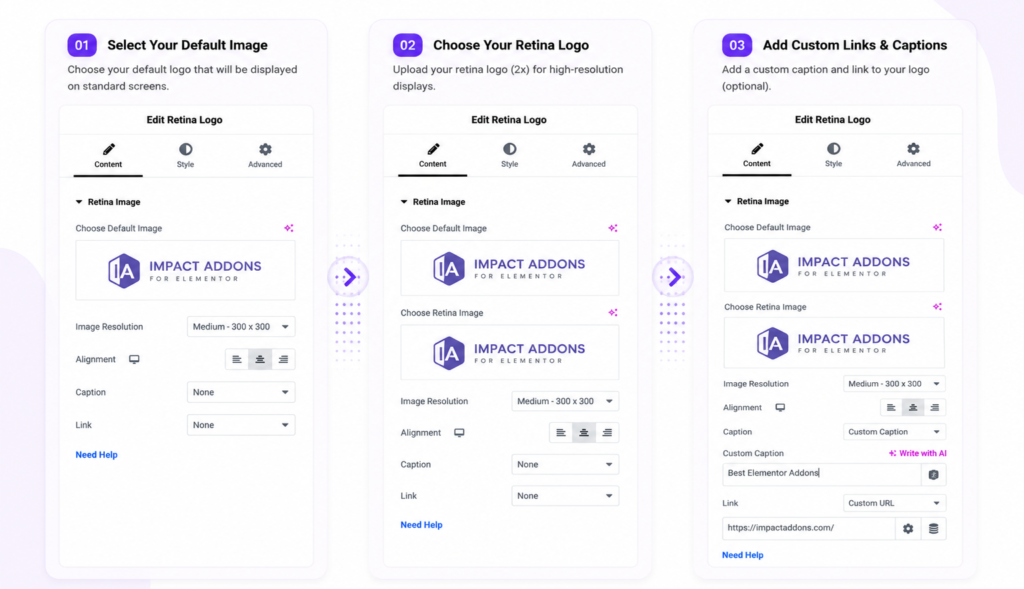
Display Retina-ready logoswith responsive sizing, custom links, captions, styling controls, and pixel-perfectclarity on every device.
PERFECT FOR
Perfect for Every WordPress Website
Whether you're building a business website, agency portfolio, WooCommerce store, blog, or personal brand, the Retina Logo widget ensures your logo stays crisp, professional, and consistent across every device.
Business Websites
Maintain strong brand identity with crystal-clear logos.
Blogs & News Websites
Strengthen brand recognition with sharp header logos.
Agency Websites
Create polished headers and branded client websites.
WooCommerce Stores
Display professional store branding throughout your online shop.
Portfolio Websites
Showcase personal or company branding with Retina-quality images.
Landing Pages
Highlight your brand with high-quality logos that leave a lasting impression.
Perfect forBusiness Websites, Agencies, WooCommerce Stores, Portfolios, Blogs, Landing Pages, Corporate Websites,and every Elementor-powered website.
Key Features
Discover powerful tools that make creating responsive, professional, and visually appealing tables in Elementor simple and efficient.
Retina HD Support
Dual Logo Upload
Responsive Controls
Homepage & Custom Links
Caption Support
Complete Styling Controls
Lightweight Performance
Seamless Elementor Integration
FrequentlyAsked Questions
What is the Retina Logo widget?
The Retina Logo widget lets you display high-resolution logos that remain sharp on Retina, 2K, and 4K displays.
Why should I use a Retina logo?
Retina logos eliminate blurry branding on high-density screens, providing a cleaner and more professional appearance.
Can I upload separate Retina and standard logos?
Yes. You can upload both a standard logo and a 2× Retina version, and the widget automatically serves the appropriate image.
Can I resize the logo for different devices?
Yes. Responsive controls allow different logo sizes for desktop, tablet, and mobile devices.
Can I link my logo?
Yes. Link your logo to your homepage or any custom URL.
Does it work with Elementor Free?
Yes. The Retina Logo widget works inside Elementor and is designed for seamless visual editing.
Ready to Build Better Website Branding?
Display crystal-clear Retina logos that automatically look sharp on every screen. Build professional headers, footers, landing pages, and navigation sections with complete design flexibility and responsive controls.
Related Widgets
Discover more Impact Widgets for Elementor to build professional headers, navigation menus, buttons, advanced headings, logo showcases, and branding sections. Combine multiple widgets to create modern, responsive, and visually consistent websites.
Related Blogs and Articles
Explore step-by-step tutorials to learn how to create custom Elementor headers, improve website branding, optimize Retina images, build responsive navigation, and design professional websites using Impact Widgets.
Impact Addons develops powerful Elementor plugins and Shopify solutions that help freelancers, agencies, developers, and businesses build better websites faster.
Follow Us
PRODUCTS
WIDGET LIBRARY
RESOURCES
SUPPORT
30-Day Money Back
Not satisfied? Get a full refund within 30 days
Secure & Reliable
100% secure payments and data protection.
Fast Support
Get quick help from our friendly support team.
Regular Updates
We release updates and new features regularly.
Copyright © 2026 Impactaddons. All Rights Reserved.
Impact Addons is proudly powered by WordPress