• Impact Forms
  • Pricing

Best Addon for Elementor

Elementor Animated Text Widget

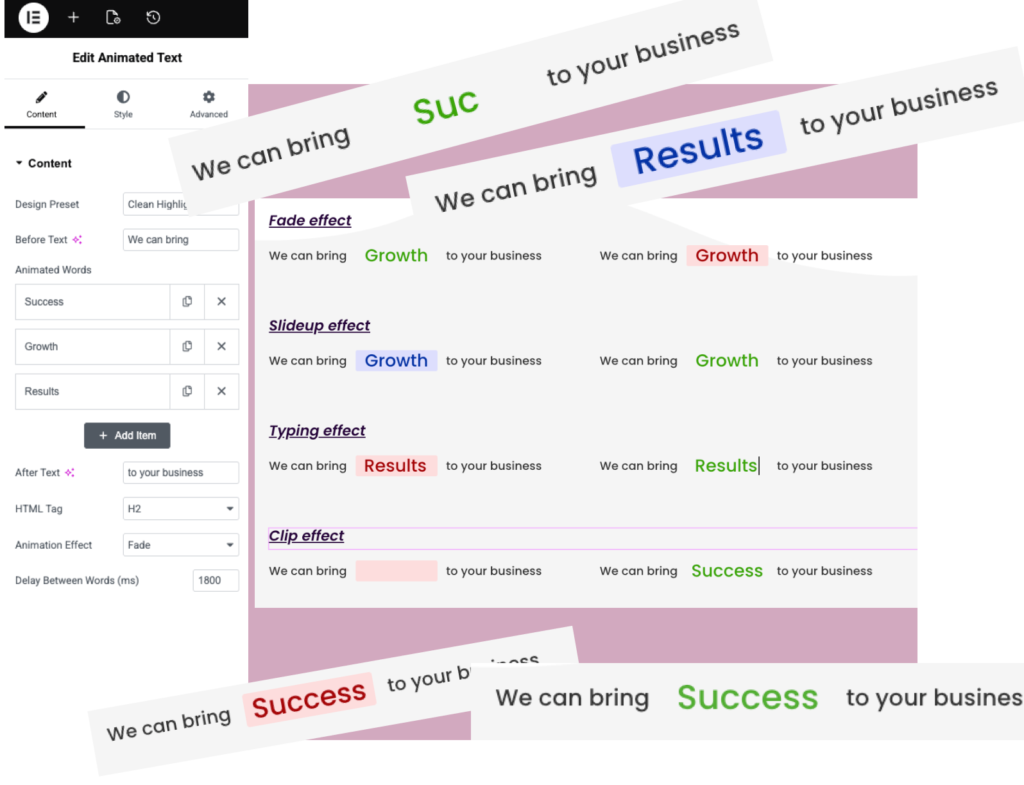
The Elementor Animated Text Widget helps you create eye-catching text effects including typing animations, rotating words, animated headlines, and dynamic content that grabs visitor attention and improves engagement.

Elementor Animated Text Widget

Why UseElementor Animated Text Widget?

Animated text helps highlight important messages, promotions, and services without overwhelming visitors. It creates a more interactive experience and can improve engagement on landing pages and marketing sections.

Highlight Key Messages

Draw attention to important words and phrases.

Increase Engagement

Keep visitors focused with dynamic text animations.

Multiple Animation Effects

Create fade, typing, slide, clip, and rotating effects.

Fully Responsive

Looks great on desktop, tablet, and mobile devices.

Live Widget Examples

Animated text helps highlight important messages, promotions, and services without overwhelming visitors. It creates a more interactive experience and can improve engagement on landing pages and marketing sections.

Fade effect

We can bringSuccessto your business

We can bringSuccessto your business

Slideup effect

We can bringSuccessto your business

We can bringSuccessto your business

Typing effect

We can bringSuccessto your business

We can bringSuccessto your business

Clip effect

We can bringSuccessto your business

We can bringSuccessto your business

Key Features

The Animated Text Widget includes typing effects, rotating text, customizable animations, responsive controls, typography settings, and flexible design options to create engaging content for Elementor websites.

Multiple Animation Effects

Typing Text Animation

Fade & Slide Effects

Rotating Text

Custom Colors

Flexible Styling

Responsive Design

Lightweight & Fast

FrequentlyAsked Questions

The Elementor Animated Text Widget allows you to create typing effects, rotating text, animated headlines, and dynamic text animations without coding.

Yes. The widget works with Elementor and can be used in Elementor-based layouts.

You can create typing, fade, slide, clip, rotating, and highlight text animations.

Yes. The Elementor Animated Text Widget works perfectly on desktop, tablet, and mobile devices.

You can use the Elementor Animated Text Widget in hero sections, landing pages, banners, service pages, product pages, and call-to-action sections.

Elementor Animated Text Widget can help draw attention to important content, promotions, services, and calls to action. By making key messages more noticeable, it can improve visitor engagement and create a more interactive browsing experience.

Yes. The Elementor Animated Text Widget supports typing animations, rotating words, and various text effects to make content more engaging.

Yes. You can control colors, fonts, spacing, and animation styling directly from Elementor.

No. The widget is optimized for performance and uses lightweight animations.

Yes. You can rotate or animate multiple words and phrases within the same heading.

Yes. The Elementor Animated Text Widget is perfect for hero sections, allowing you to display rotating words, typing effects, and dynamic headlines that immediately capture visitor attention and highlight important messages.

Ready to Create Engaging Animated Text?

Add eye-catching text animations to your Elementor website and highlight important messages with ease.

Related Widgets

Explore more Elementor widgets to build interactive and engaging website sections.