Impact Addons
Build Fast. Impact Bigger

- Products
-
-
Elementor
Impact WidgetsElementor widget pack with advanced design widgets.
Impact Grid AddonElementor grid widget addon with flexible card layouts and design controls.
Impact Template BuilderWooCommerce template builder for Cart and Checkout with Elementor-powered Impact Pro Templates.
Impact FormsElementor contact form builder with submission storage and email workflows.
-
-
- Widgets
-
-

Impact Widgets
Impact Grid Addon
-
-
- Templates
-
-

Impact Template Builder
-
-
- Impact Forms
- Pricing
- Resources
- Support
Best Addon for Elementor
Advanced Table for Elementor
The Advanced Table widget for Elementor lets you build beautiful,
responsive, fully customizable tables directly inside the Elementor
editor. Create pricing tables, product comparison tables, feature
lists, schedules, technical specifications, and large datasets using
a drag-and-drop interface — no code required.
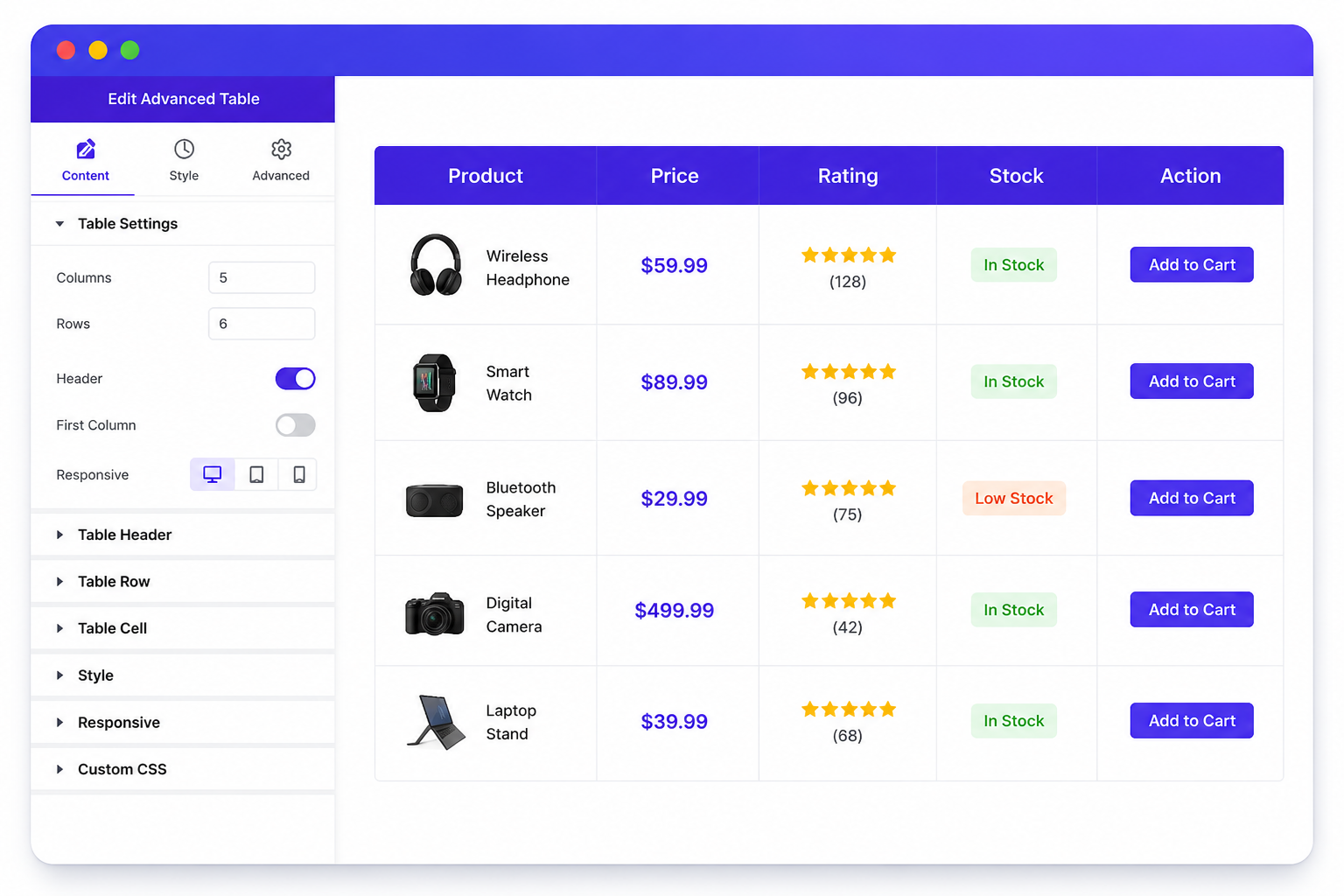
Why UseAdvanced Table ?
A clean table improves readability and helps visitors compare products, services, or data at a glance. Whether you’re building an Elementor pricing table, a product comparison chart, a class schedule, or a technical spec sheet, the Advanced Table widget gives you complete control over layout, styling, and responsiveness — right
inside Elementor.
Responsive Table Layout
Build mobile-friendly tables that automatically adapt to desktop, tablet, and mobile devices — no separate mobile design needed.
Advanced Customization
Customize rows, columns, cells, typography, colors, borders, spacing, and hover effects without touching a line of CSS.
Rich Content Support
Display text, images, icons, buttons, badges, ratings, and custom HTML inside every table cell.
Perfect for Any Use Case
Create pricing tables, comparison charts, technical specifications, schedules, and product information tables with ease.
WHAT CAN YOU BUILD?
Create Powerful Responsive Tables
Design modern, responsive Elementor tables for products, pricing,
comparisons, schedules, specifications, and business data. The
Advanced Table widget gives you complete control over every row,
column, and cell, with a seamless experience across all devices.
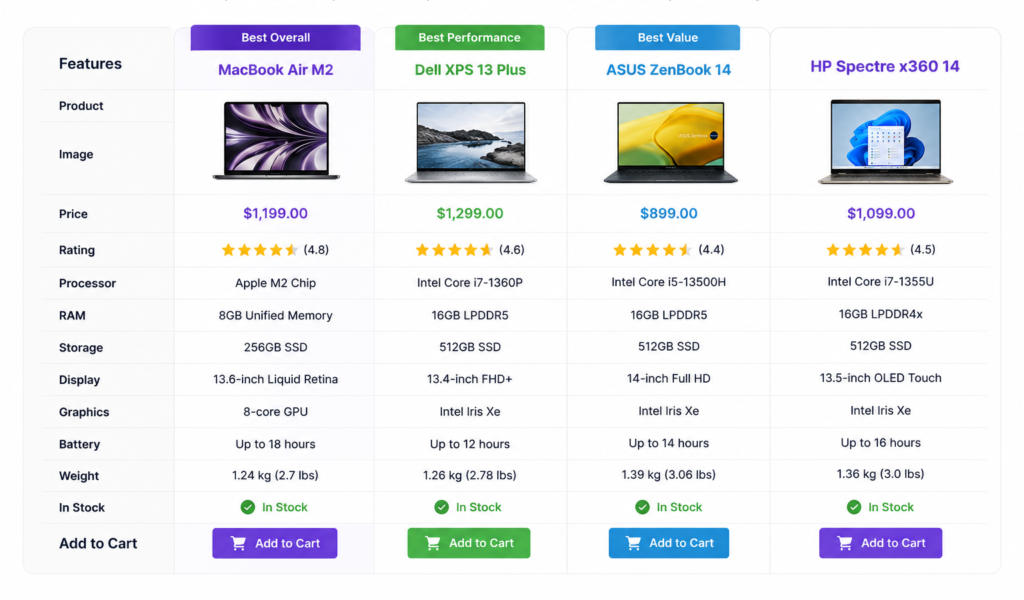
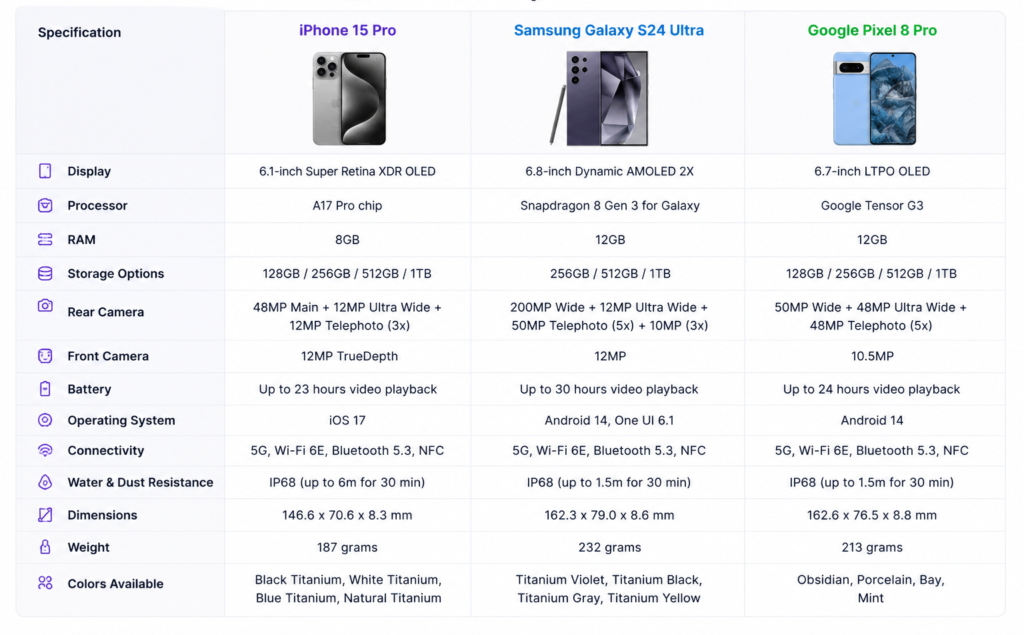
Product Comparison Tables
Compare products side by side with images, prices, ratings, stock status, and call-to-action buttons. Ideal for WooCommerce stores that want to help shoppers decide faster.
Pricing Tables
Present pricing plans with feature lists, highlighted "best value" columns, icons, and buttons designed to increase conversions on SaaS and membership sites.
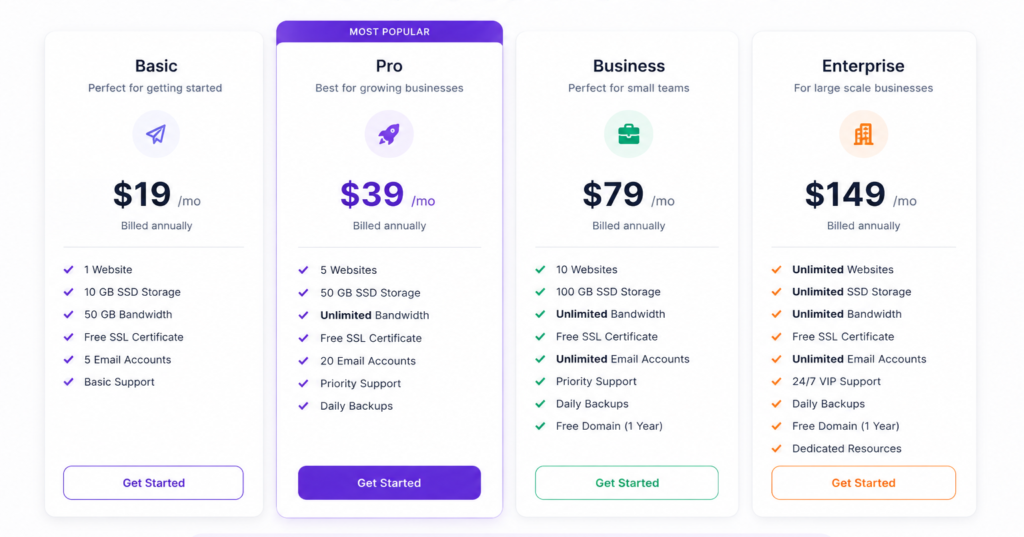
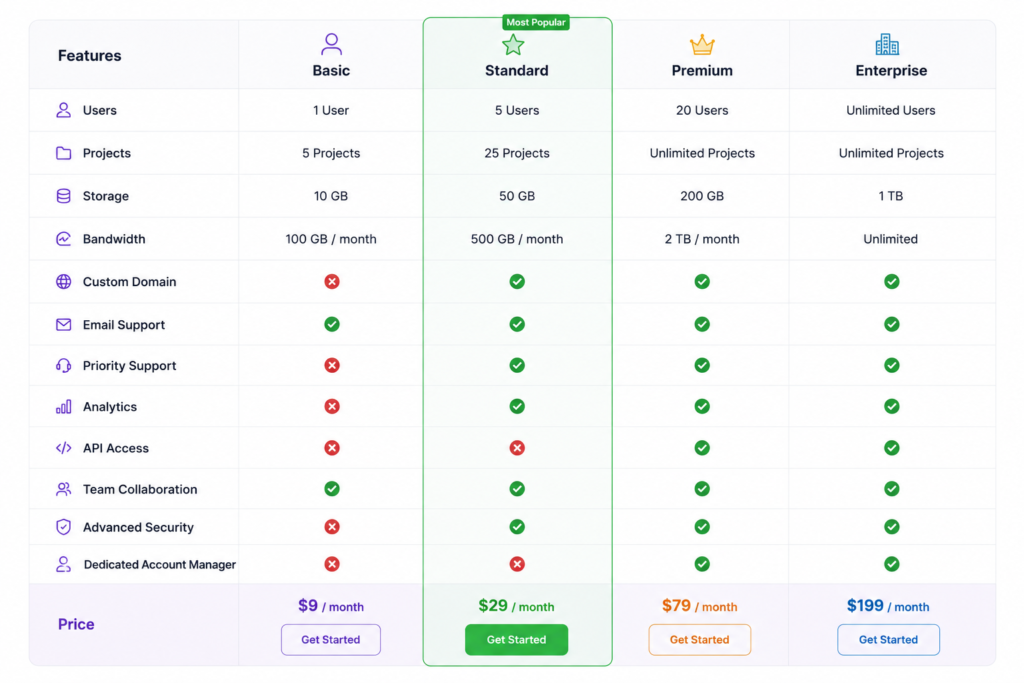
Feature Comparison
Build feature-matrix tables that clearly compare products, services, software editions, or subscription tiers — checkmarks, icons, and short labels included.
Technical Specifications
Organize dimensions, compatibility, materials, and other product details into a clean, easy-to-scan spec table.
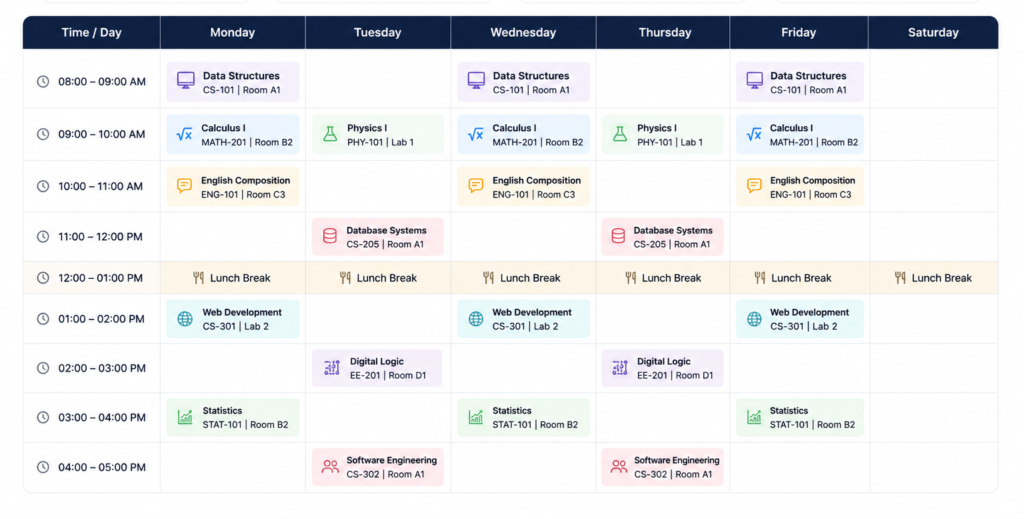
Timetables & Schedules
Create class schedules, meeting agendas, event timetables, or business hours using an organized table layout instead of a static image.
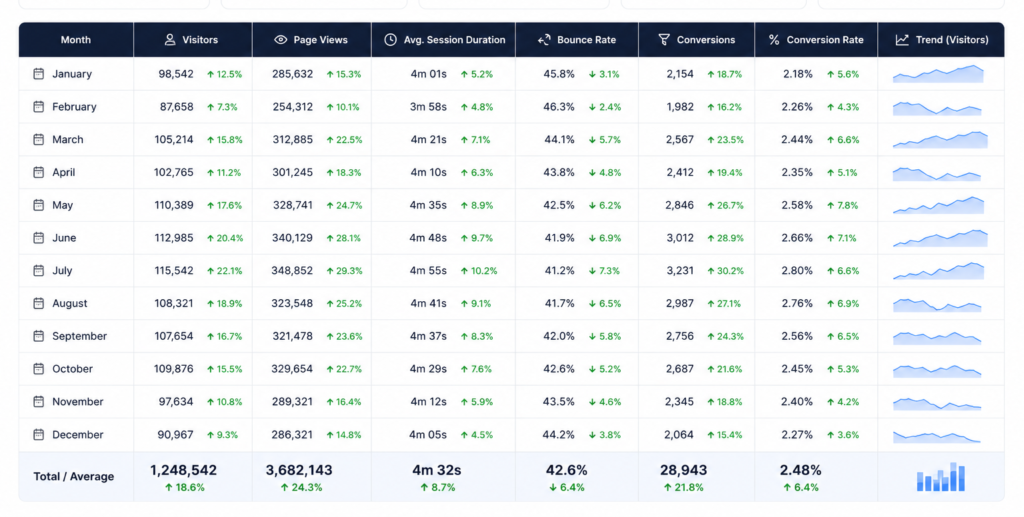
Statistics & Data Reports
Present business reports, analytics, research data, and financial figures in a structured, professional table format.
Build responsive Elementor tables withimages, icons, buttons, ratings, and badges — full custom styling, unlimited rows and columns,no code required.
PERFECT FOR
Perfect for Every WordPress Website
Whether you're building a WooCommerce store, a business website, an
agency portfolio, or an educational platform, the Advanced Table
widget helps you organize information in a clear, responsive, and
professional layout — without a developer.
WooCommerce Stores
Compare products, display pricing, specifications, and availability using attractive comparison tables that help customers buy with confidence.
SaaS & Pricing Pages
Present subscription plans and feature comparisons with clean pricing tables built to improve conversions.
Business & Corporate Websites
Show service comparisons, company information, pricing packages, and specifications in a structured, on-brand layout.
Educational Websites
Display class schedules, course timetables, exam dates, and academic information in organized, easy-to-scan tables.
Perfect forWooCommerce, SaaS, Agencies, Business Websites, Educational Portals, Documentation Sites, Pricing Pages Reports,and Elementor-powered websites.
Key Features
Discover powerful tools that make creating responsive, professional, and visually appealing tables in Elementor simple and efficient.
Responsive Tables
Rich Content Support
Full Design Control
Sorting Ready
Custom Colors & Typography
Lightweight Performance
Right Side Image
Elementor Friendly
FrequentlyAsked Questions
What is the Advanced Table widget for Elementor?
The Advanced Table widget allows you to create responsive and fully customizable tables in Elementor without writing code. You can build comparison tables, pricing tables, specification tables, schedules, and data tables with an easy visual editor.
Can I create responsive tables with the Advanced Table widget?
Yes. All tables created with the Advanced Table widget are fully responsive and automatically adapt to desktop, tablet, and mobile devices for the best user experience.
What types of tables can I build?
You can create:
- Product comparison tables
- Pricing tables
- Feature comparison tables
- Specification tables
- Timetables and schedules
- Statistics and data tables
- Custom information tables
Can I add images, icons, and buttons inside table cells?
Yes. The widget supports rich cell content, allowing you to insert text, images, icons, buttons, badges, ratings, and custom HTML within individual table cells.
Will large tables affect my website performance?
The Advanced Table widget is built with optimized code to deliver fast loading performance. Well-structured tables remain lightweight and responsive even with multiple rows and columns.
Can I customize the table design?
Absolutely. You can customize headers, rows, columns, borders, colors, typography, spacing, alignment, and hover effects to match your website’s branding.
Does the Advanced Table widget work with any Elementor theme?
Yes. The widget is compatible with Elementor and works with most WordPress themes that support Elementor.
Can I create product comparison tables for WooCommerce?
Yes. The Advanced Table widget is ideal for creating product comparison tables that help customers compare features, specifications, pricing, and other product details.
Is coding required to use the Advanced Table widget?
No. The widget provides a drag-and-drop interface inside Elementor, allowing you to build and customize tables visually without any coding knowledge.
Why choose Impact Advanced Table for Elementor?
Impact Advanced Table combines powerful customization, responsive layouts, rich content support, and an intuitive editing experience to help you build professional tables quickly and efficiently within Elementor.
Ready to Create Professional Tables with Elementor?
Design responsive data tables, pricing tables, product comparison
tables, and feature matrices in minutes — right inside Elementor. The
Advanced Table widget gives you complete control over every row,
column, and cell, so your tables present information clearly and
match your site's design perfectly.
Related Widgets
Complete your Elementor toolkit with more advanced widgets from Impact Addons. From comparison tables and content layouts to navigation and dynamic elements, our widgets help you build modern, responsive, and conversion-focused websites without coding.
Related Blogs and Articles
Browse our latest tutorials to learn how to create responsive data tables, product comparison tables, pricing tables, and feature matrices with Elementor. Follow practical guides, best practices, and real-world examples to build professional websites faster.
Impact Addons develops powerful Elementor plugins and Shopify solutions that help freelancers, agencies, developers, and businesses build better websites faster.
Follow Us
PRODUCTS
WIDGET LIBRARY
RESOURCES
SUPPORT
30-Day Money Back
Not satisfied? Get a full refund within 30 days
Secure & Reliable
100% secure payments and data protection.
Fast Support
Get quick help from our friendly support team.
Regular Updates
We release updates and new features regularly.
Copyright © 2026 Impactaddons. All Rights Reserved.
Impact Addons is proudly powered by WordPress