


Elementor widget pack with advanced design widgets.
Elementor grid widget addon with flexible card layouts and design controls.
WooCommerce template builder for Cart and Checkout with Elementor-powered Impact Pro Templates.
Elementor contact form builder with submission storage and email workflows.
The Elementor Timeline Widget helps you create interactive timelines, project roadmaps, company history sections, milestone trackers, and process timelines. The Elementor Timeline Widget presents information in a structured and visually engaging format that improves user experience and content organization.
The Elementor Timeline Widget allows you to showcase events, milestones, achievements, project progress, and historical information in a clear and organized layout. It helps visitors follow information chronologically while improving content presentation.
Display company growth, achievements, project stages, and important events in a structured format.
Present information chronologically to create engaging user experiences.
Create product roadmaps, project timelines, event schedules, and business journeys.
Works perfectly on desktop, tablet, and mobile devices.
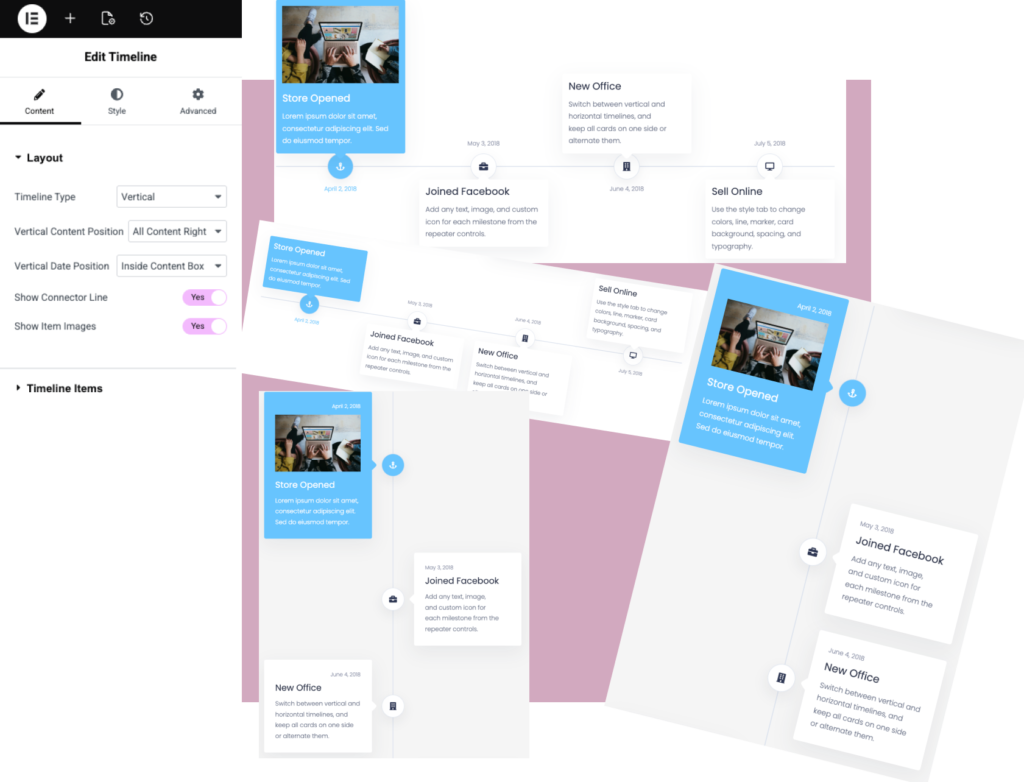
Explore different Timeline layouts including company history, project roadmaps, event schedules, milestones, achievements, and business growth stories.
Lorem ipsum dolor sit amet, consectetur adipiscing elit. Sed do eiusmod tempor.
Add any text, image, and custom icon for each milestone from the repeater controls.
Switch between vertical and horizontal timelines, and keep all cards on one side or alternate them.
Use the style tab to change colors, line, marker, card background, spacing, and typography.

Lorem ipsum dolor sit amet, consectetur adipiscing elit. Sed do eiusmod tempor.
Add any text, image, and custom icon for each milestone from the repeater controls.
Switch between vertical and horizontal timelines, and keep all cards on one side or alternate them.
Use the style tab to change colors, line, marker, card background, spacing, and typography.
Lorem ipsum dolor sit amet, consectetur adipiscing elit. Sed do eiusmod tempor.
Add any text, image, and custom icon for each milestone from the repeater controls.
Switch between vertical and horizontal timelines, and keep all cards on one side or alternate them.
Use the style tab to change colors, line, marker, card background, spacing, and typography.
Lorem ipsum dolor sit amet, consectetur adipiscing elit. Sed do eiusmod tempor.
Add any text, image, and custom icon for each milestone from the repeater controls.
Switch between vertical and horizontal timelines, and keep all cards on one side or alternate them.
Use the style tab to change colors, line, marker, card background, spacing, and typography.
Lorem ipsum dolor sit amet, consectetur adipiscing elit. Sed do eiusmod tempor.
Add any text, image, and custom icon for each milestone from the repeater controls.
Switch between vertical and horizontal timelines, and keep all cards on one side or alternate them.
Use the style tab to change colors, line, marker, card background, spacing, and typography.
Lorem ipsum dolor sit amet, consectetur adipiscing elit. Sed do eiusmod tempor.
Add any text, image, and custom icon for each milestone from the repeater controls.
Switch between vertical and horizontal timelines, and keep all cards on one side or alternate them.
Use the style tab to change colors, line, marker, card background, spacing, and typography.
Lorem ipsum dolor sit amet, consectetur adipiscing elit. Sed do eiusmod tempor.
Add any text, image, and custom icon for each milestone from the repeater controls.
Switch between vertical and horizontal timelines, and keep all cards on one side or alternate them.
Use the style tab to change colors, line, marker, card background, spacing, and typography.
Lorem ipsum dolor sit amet, consectetur adipiscing elit. Sed do eiusmod tempor.
Add any text, image, and custom icon for each milestone from the repeater controls.
Switch between vertical and horizontal timelines, and keep all cards on one side or alternate them.
Use the style tab to change colors, line, marker, card background, spacing, and typography.
The Elementor Timeline Widget allows you to display events, milestones, achievements, and chronological information in an interactive timeline layout.
No. Timeline is a premium widget available exclusively in Impact Widgets Pro.
No. Timeline works with Impact Widgets Pro and does not require Elementor Pro.
Yes. The Elementor Timeline Widget is perfect for displaying company history, business growth journeys, achievements, and important milestones in a visual format.
Yes. Display product releases, upcoming features, development stages, and project plans.
Yes. The Elementor Timeline Widget is fully responsive and works smoothly across desktop, tablet, and mobile devices.
Yes. Customize colors, typography, spacing, connectors, icons, and timeline layouts.
No. Timeline is lightweight and optimized for fast-loading Elementor websites.
You can use the Elementor Timeline Widget for roadmaps, project timelines, company history sections, process steps, event schedules, and milestone tracking.
Explore more Elementor widgets to build interactive and engaging website sections.
Impact Addons develops powerful Elementor plugins and Shopify solutions that help freelancers, agencies, developers, and businesses build better websites faster.
Not satisfied? Get a full refund within 30 days
100% secure payments and data protection.
Get quick help from our friendly support team.
We release updates and new features regularly.
Copyright © 2026 Impactaddons. All Rights Reserved.
Impact Addons is proudly powered by WordPress
Unlock premium layouts and advanced grid features
Get impact elementor bundle and save up to 40%
Unlock premium layouts and advanced widgets
Get impact elementor bundle and save up to 40%
Unlock premium layouts and advanced grid features
Get impact elementor bundle and save up to 40%
Please fill out the form below and we will get back to you as soon as possible