• Impact Forms
  • Pricing

Best Addon for Elementor

Elementor Advanced Button Widget

The Elementor Advanced Button Widget helps you create professional call-to-action buttons with custom styling, icons, hover effects, animations, and advanced design options. Improve conversions and guide visitors to important actions across your website.
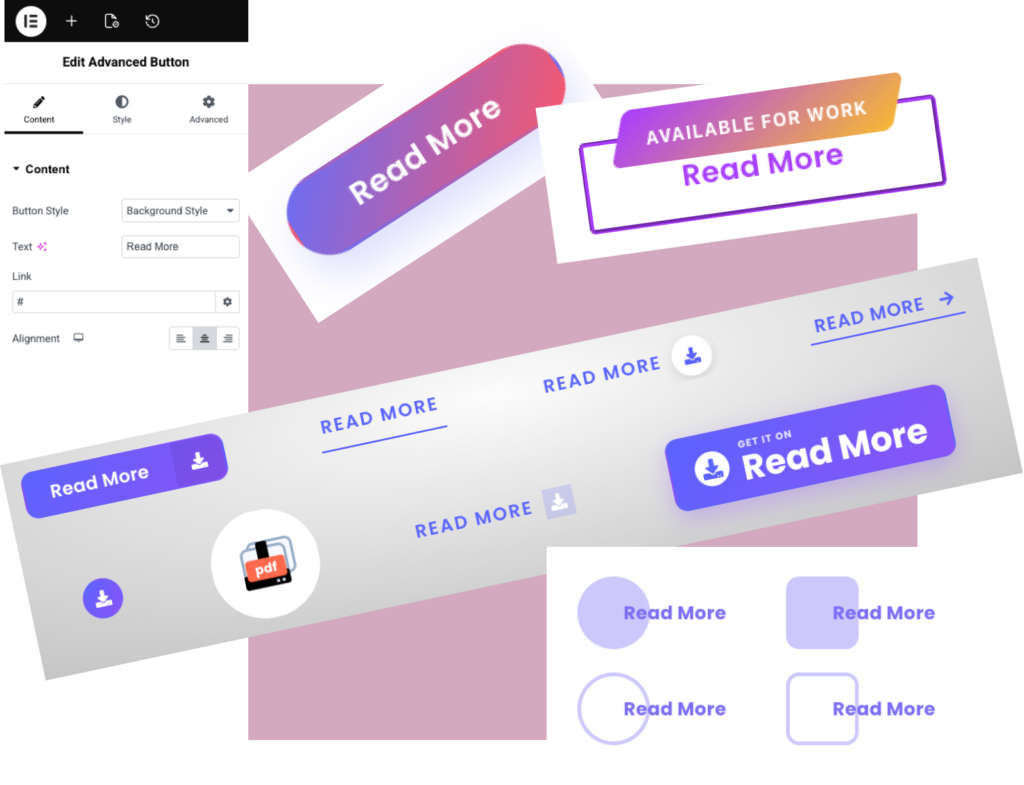
Elementor Advanced Button Widget

Why Usethe Elementor Advanced Button Widget?

The Elementor Advanced Button Widget gives you greater control over button design and functionality. Create engaging call-to-action buttons that improve user interaction, increase conversions, and match your website branding.

High-Converting Buttons

Create attractive call-to-action buttons that increase clicks.

Advanced Styling Controls

Customize colors, borders, icons, spacing, and hover effects.

Multiple Button Layouts

Build bordered, badge, ribbon, download, and promo buttons.

Fully Responsive

Looks great on desktop, tablet, and mobile devices

Live Widget Examples

Explore different button styles including bordered, ribbon, badge, download, and promotional buttons. Perfect for call-to-actions, downloads, offers, and lead generation.

Background Style Button

Design eye-catching buttons with customizable background styles. Choose from solid colors, gradients, overlays, and hover effects to match your brand perfectly. With full control over spacing, typography, and animations, create modern, high-converting buttons that enhance user interaction and elevate your Elementor designs effortlessly.

Bordered style Button

Create sleek, modern buttons with customizable border styles. Adjust border width, color, radius, and hover effects to achieve a clean, professional look. Perfect for minimal designs, bordered buttons add subtle emphasis while maintaining clarity and elegance in your Elementor layouts.

Accent Overlay(merged) Button

Create visually striking buttons with a merged accent overlay effect. Blend background and overlay colors seamlessly to highlight interactions and add depth. Customize colors, opacity, and hover transitions to achieve a modern, engaging look—perfect for boosting attention and conversions in your Elementor designs.

Badge Content Button

Create dynamic buttons with integrated badge content to highlight offers, updates, or key actions. Add customizable badges with text, colors, and positioning to draw attention instantly. Perfect for promotions and notifications, this style enhances visibility while keeping your Elementor design clean, modern, and engaging.
Read More AVAILABLE FOR WORK

Ribbon Tag Button

Create attention-grabbing buttons with stylish ribbon tags to highlight key actions, offers, or statuses. Customize ribbon text, colors, position, and hover effects to match your design. Perfect for promotions and featured content, this layout adds a bold, modern touch while keeping your Elementor pages clean and engaging.

Downloadable Button​

Create user-friendly downloadable buttons that make file access quick and intuitive. Add icons, file details, and customizable styles to guide users clearly. With full control over layout, colors, and hover effects, this button enhances usability and delivers a smooth download experience in your Elementor designs.

Key Features

Multiple Button Styles

Icon Support

Ribbon & Badge Buttons

Download Buttons

Hover Effects

Advanced Styling Controls

Responsive Design

Lightweight & Fast

FrequentlyAsked Questions

The Elementor Advanced Button Widget allows you to create highly customizable buttons with advanced styling, icons, hover effects, animations, and flexible design options.

Yes. The widget works inside Elementor and allows advanced button designs and styling.

Yes. The Elementor Advanced Button Widget supports icons before or after button text, helping create more attractive and engaging call-to-action buttons.

Yes. The widget supports download-style button layouts and call-to-action buttons.

Yes. The Elementor Advanced Button Widget is fully responsive and allows you to customize button appearance across desktop, tablet, and mobile devices.

Yes. You can fully customize colors, backgrounds, borders, spacing, and hover animations.

Yes. You can create badge buttons, ribbon buttons, promotional buttons, and offer-based layouts.

You can use the Elementor Advanced Button Widget in landing pages, pricing sections, product pages, service pages, contact sections, and anywhere you want to encourage visitors to take action.

Ready to Create Better Call-To-Action Buttons?

Design attractive Elementor buttons with advanced styles, badges, ribbons, icons, and conversion-focused layouts.

Related Widgets

Explore more Elementor widgets to build interactive and engaging website sections.